7.6.5 Email Setup

Contents
Email alarms can be setup by pressing the Set email button.
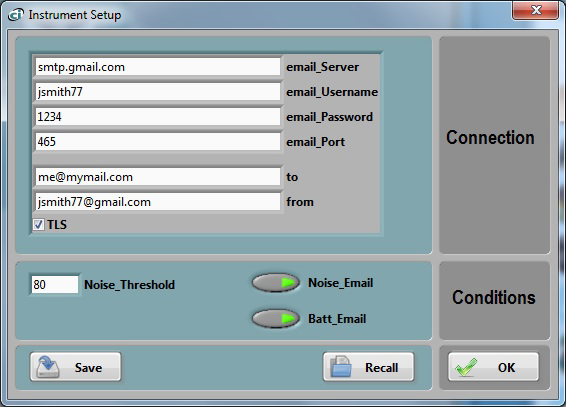
Figure 11 Email Setup
Email alarms require the following conditions:
• The WiFi setup must have already been done so the instrument can connect to a router or access point.
• That router or access point must be connected to the internet.
• The user must have an email account to use for outgoing email. A good solution is to use a gmail account.
The email setup is not always easy. See https://convergenceinstruments.com/pdf/Gmail_Setup.pdf for details.
The complete email setup is similar to the configuration of any email application. It includes the following:
• Email server The internet name of the outgoing email server.
• Port number The TCP port number of the email service. This is usually:
o 25 for an “open” (no security) account.
o 465 for SSL security
o 587 for TLS security
For gmail this is port 587 or 465.
• User-name The account name. For gmail it is the user’s account name (to the right of the @ sign).
• Password The account password (leave blank for an “open” (no security) account).
• TLS The security setting. This is the only secure mode supported. Uncheck for an “open” (no security) account.
In addition to these settings, the email alarms settings let you set:
• One Recipient The recipient line (to line in Figure 11).
• The sender’s address
The application by default shows the settings for a fictitious secure gmail account (see Figure 11). These settings of course need to be changed to reflect the user’s own email account settings.
In addition see https://convergenceinstruments.com/pdf/Gmail_Setup.pdf for addtional settings of the gmail account itself.
Two types of alarms can be sent:
• An alarm when a set noise threshold is exceeded
• An alarm when the battery level is too low. The level cannot be adjusted. It is set so the instrument has enough reserves to send the alarm.